video production team"},{"@type":"BreadcrumbList","@id":"https:\/\/www.storyblocks.com\/resources\/guides\/guide-to-building-an-in-house-video-production-team#breadcrumb","itemListElement":[{"@type":"ListItem","position":1,"name":"Resources","item":"https:\/\/www.storyblocks.com\/resources\/"},{"@type":"ListItem","position":2,"name":"Guides & Reports","item":"https:\/\/www.storyblocks.com\/resources\/guides"},{"@type":"ListItem","position":3,"name":"The complete guide to building an in-house video production team"}]},{"@type":"WebSite","@id":"https:\/\/www.storyblocks.com\/resources\/#website","url":"https:\/\/www.storyblocks.com\/resources\/","name":"Storyblocks","description":"Meet the growing demand for video with subscription plans that give you unlimited stock downloads, flexible licensing, and an easy-to-use video editor.","publisher":{"@id":"https:\/\/www.storyblocks.com\/resources\/#organization"},"potentialAction":[{"@type":"SearchAction","target":{"@type":"EntryPoint","urlTemplate":"https:\/\/www.storyblocks.com\/resources\/?s={search_term_string}"},"query-input":{"@type":"PropertyValueSpecification","valueRequired":true,"valueName":"search_term_string"}}],"inLanguage":"en-US"},{"@type":"Organization","@id":"https:\/\/www.storyblocks.com\/resources\/#organization","name":"Storyblocks","url":"https:\/\/www.storyblocks.com\/resources\/","logo":{"@type":"ImageObject","inLanguage":"en-US","@id":"https:\/\/www.storyblocks.com\/resources\/#\/schema\/logo\/image\/","url":"https:\/\/sb-wp-assets.storyblocks.com\/resources\/wp-content\/uploads\/2023\/12\/27112124\/sb-logo.svg","contentUrl":"https:\/\/sb-wp-assets.storyblocks.com\/resources\/wp-content\/uploads\/2023\/12\/27112124\/sb-logo.svg","width":300,"height":64,"caption":"Storyblocks"},"image":{"@id":"https:\/\/www.storyblocks.com\/resources\/#\/schema\/logo\/image\/"},"sameAs":["https:\/\/www.facebook.com\/storyblocks\/","https:\/\/x.com\/StoryblocksCo","https:\/\/www.linkedin.com\/company\/storyblocks\/","https:\/\/www.instagram.com\/StoryblocksCo\/","https:\/\/www.youtube.com\/channel\/UCrxwwZTQOPCTUVlHsjNU7Fw"]}]}
Skip to content
Guides & Reports
The complete guide to building an in-house video production team
Video has become a core part of how teams communicate across marketing, product, sales, and customer education. And as volume increases, so do expectations around speed, consistency, and relevance. At some point, outsourcing production stops making sense.
This guide is for growing teams looking to make the shift from outsourcing to in-house. We’ll cover:
Whether an in-house production team makes sense for your organization
Who your first video production hire should be
What equipment is worth investing in
How to operate a small team efficiently and effectively
You’ll also hear directly from Storyblocks’ in-house team and other video leaders who are running production day to day.
Ready to learn what goes into building an effective in-house video production team? Let’s get started.
Bringing video production in-house
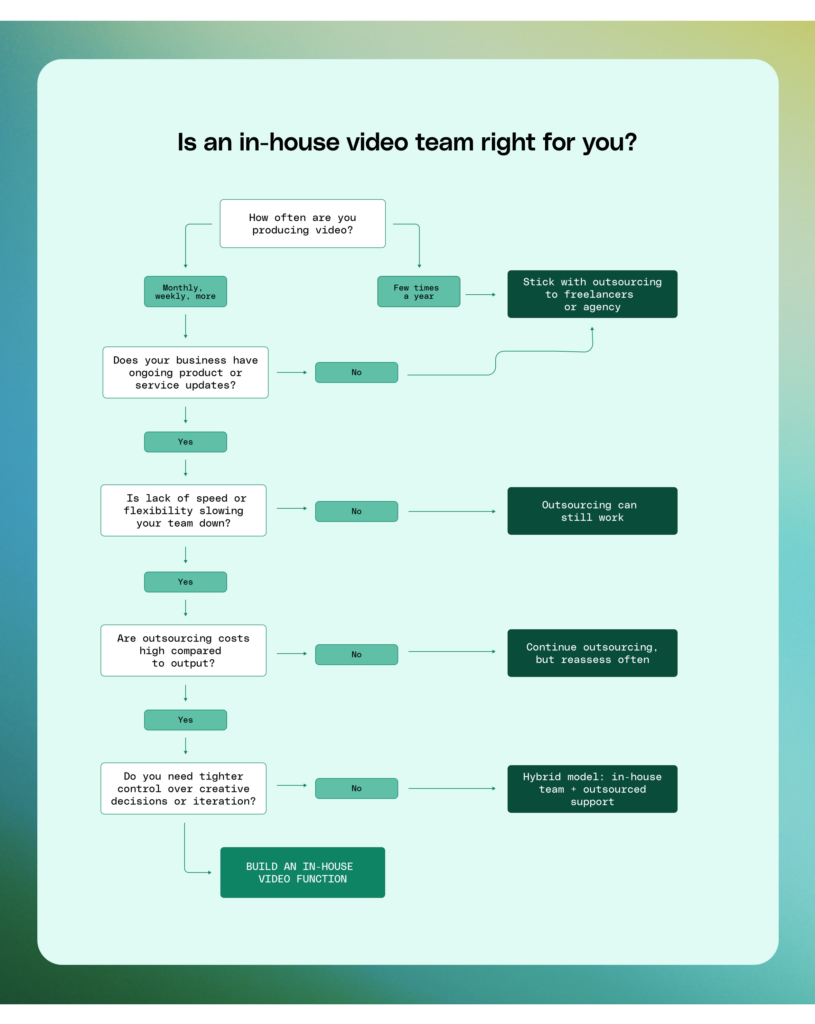
When does an organization need an in-house team?
The shift usually happens when video stops being an occasional project and becomes an ongoing function. That tends to be the case when video supports multiple parts of the business—marketing campaigns, product updates, sales enablement, customer education, or internal communications—and needs to be produced consistently, not just a few times a year.
At that point, the way video gets made starts to matter as much as the videos themselves.
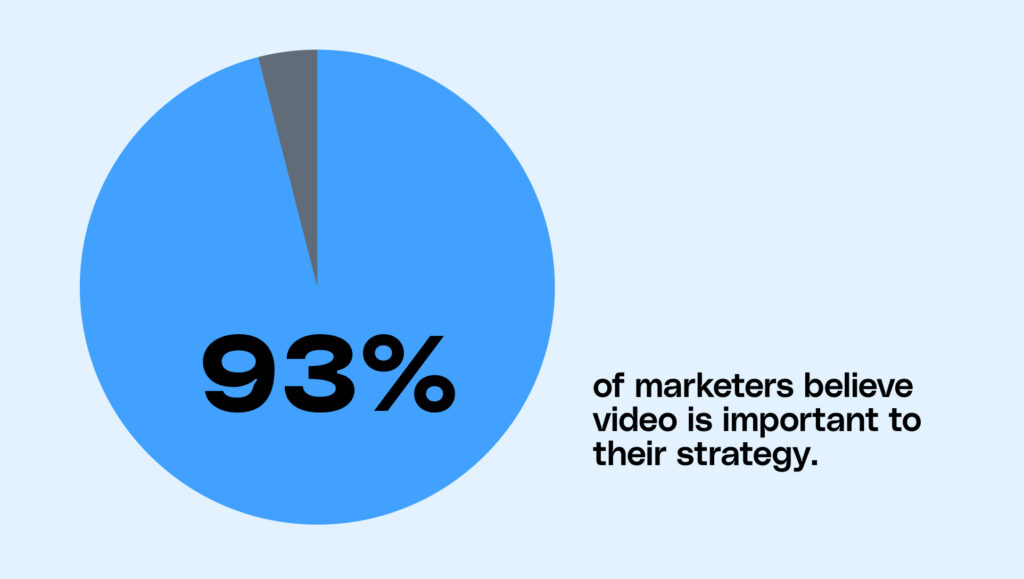
The numbers reflect this. According to Wistia, nearly two-thirds of businesses (71%) had an in-house video producer or team in 2024, while only 14% primarily outsourced production. Despite broader creative budget cuts across 2024 and 2025, 93% of marketers still consider video an important part of their marketing strategy, and 91% of businesses are actively using video marketing in 2026.
An in-house production team is worth considering if you can relate to even one of the following scenarios:
You’re producing videos consistently
If you’re producing video weekly or even monthly, it’s a good time to consider bringing someone in-house.
“I think the pivotal moment comes down to the volume of video you’re producing and the pace, says Kaitlyn Rossi, Creative Director at Storyblocks. “If you produce four videos a year that you’re putting on your website or social media, it makes sense just to work with a freelancer to execute those projects. But if you are creating videos on a daily, weekly, or even monthly basis, it 100% makes sense to have an in-house operation.”
Whether your business sells evergreen products or releases new items on a seasonal basis also influences how much video content you put out.
“We’re a software company, so there are always new updates, ” says Kyle Miller, Manager of Video Production at Storyblocks. “When product features come out, there’s always something new to discuss. We always want to communicate that, and video is a fantastic medium for communication. Having someone in-house is a huge resource for our team.”.
Outsourcing is slowing you down or costing too much
When you outsource videos, finding an agency or freelancer with the expertise you need for your production is hard. And when you do find a good fit, odds are good that they’re way over budget.
“When the cost of outsourcing video creation to a freelancer greatly outweighs what it would cost to produce video in-house, it’s probably the right decision to make,” says Rossi. “Plus, your team retains more control, and you can move a lot faster.”
You need faster turnaround and more flexibility
When you outsource, you have to accommodate the contractor’s schedule. They’re not always available to quickly jump into other projects, like that paid video campaign you decided to test or the YouTube Short you wanted to publish. But if you have an in-house videographer and editor, they can work on a wide range of projects and switch priorities more easily.
The bottom line: when the cost of outsourcing video work to a freelancer or agency greatly outweighs the cost of producing video in-house with one or two full-time employees, it’s time to move production in-house.
So, what’s holding organizations back from bringing production in-house?
Most teams aren’t struggling to justify why video matters. They’re struggling to produce it consistently at the speed that leaders demand and the business needs.
96% of marketers have seen content demand increase at least 2x over the last two years
36% say they struggle to find time for content creation and ideation
31% cite lengthy manual approvals as a barrier to production
At the same time, demand for video is not slowing down. Wistia found that only 5% of companies are cutting their video budgets, while over half are investing more in video this year. Wistia also notes that more companies are bringing video production in-house as they look for faster, more flexible ways to keep up with demand.
That’s usually what’s sitting underneath leadership hesitation. The concern is less about whether video deserves investment and more about whether the team can support it without adding new bottlenecks.
How in-house video changes your production model (and why it pays off)
Instead of working project to project, an in-house team builds context, speed, and creative alignment over time. That shift has a direct impact on how efficiently your team produces video—and how much value each new asset delivers.
Production becomes a system, not a series of one-off projects
When you rely on external partners, each project starts from a new creative brief. New goals, new alignment, new coordination. As video demand increases, those steps repeat—and so do the associated costs and delays.
Bringing production in-house allows your team to carry context forward. Workflows become repeatable, decisions get faster, and production no longer requires resetting with every new request.
Over time, this creates a more predictable system where output scales without adding the same level of overhead.
Your team retains ownership of assets and workflows
When video is handled in-house, your team maintains access to raw footage, project files, and past edits. That continuity removes the friction that often comes with outsourcing—tracking down files, recreating assets, or relying on someone else’s archive.
As Casey Clark, Sr. Manager of Video at Luma Health, explains, “If anyone needs anything, I know exactly where to find it. I’m the one who put it there in the first place, so I can just get the team what they need a lot quicker than having to reach out to somebody else to do it.”
That ownership compounds over time. Each new project builds on what already exists instead of starting from zero.
Speed improves because your team works within your business rhythm
An in-house team operates alongside your campaigns, product updates, and distribution needs. They don’t need to be briefed into context—they’re already part of it.
That proximity makes it easier to test ideas, respond to new opportunities, and adjust priorities without reworking timelines.
Having an in-house video team allows you to move faster, especially when you want to test out ideas quickly. Without initiating lengthy briefings, kick-off calls, signing contracts, or setting up extensive preparations for straightforward, light concepts, an internal editor or a dedicated team can swiftly bring these ideas to life.
Kyle Miller
Manager of Video Production at Storyblocks
That speed becomes especially valuable when timelines are compressed.
As Rossi shares, “We recently received a request to launch a campaign on Instagram in just two days, asking if we could quickly produce a video targeting a specific audience. We managed to deliver on this tight deadline—something that would be pretty much impossible with freelancers or an agency.”
Creative quality improves through accumulated context
Because an in-house team is consistently involved in production, they develop a clear understanding of what resonates with your audience and what doesn’t.
That insight doesn’t come from a single project. It builds over time as the team connects performance to creative decisions.
“Once you have a team that has been with the company for a bit longer, they know what has worked and what hasn’t,” Miller notes. “They also have hunches about why it may or may not have worked. If it didn’t work in the past, they can analyze what went wrong.”
Costs become easier to manage as production scales
As video output increases, outsourcing costs tend to scale with each asset. Every new project introduces additional spend across production roles, revisions, and coordination.
An in-house model shifts that equation. Costs align more closely with team capacity rather than individual deliverables, making it easier to forecast and control spend over time.
“Determine how to keep your costs low by bringing in another person,” advises Rossi. “For example, if we were to add another editor to our team, could we eliminate the budget to support those projects we can’t take on in-house? And what’s the additional benefit they will provide to the business? Look for areas where you can replace a skill that maybe you’re spending a lot of money on by bringing someone in-house.”
Why this shift matters—and how to make the case to leadership
When you look at video production this way, the conversation shifts. You’re now evaluating a system—how work flows, how quickly it moves, and how efficiently it scales as demand increases.
For teams producing video consistently, that system becomes more predictable, more responsive, and more cost-efficient over time.
This is also how to frame the shift to leadership.
Instead of positioning in-house video as an added cost, anchor the conversation in how your current production model performs at scale. Look at how often your team briefs external partners, how long projects take to turn around, and how spend accumulates across each stage of production. As output increases, those steps repeat—and so do the delays and costs tied to them.
Bringing production in-house changes that dynamic. Your team carries context forward, builds repeatable workflows, and reduces the need to reset with every new project. Over time, production becomes easier to plan, faster to execute, and more aligned with the pace of the business.
When you present it this way, the decision moves beyond creative preference. It becomes a question of how efficiently your team can produce video as demand continues to grow.
How to make the right first video hire
Start with a producer who can bridge strategy and execution
Your first hire needs to do more than execute on video production. They need to help define what gets made, how it gets made, and why it matters to the business.
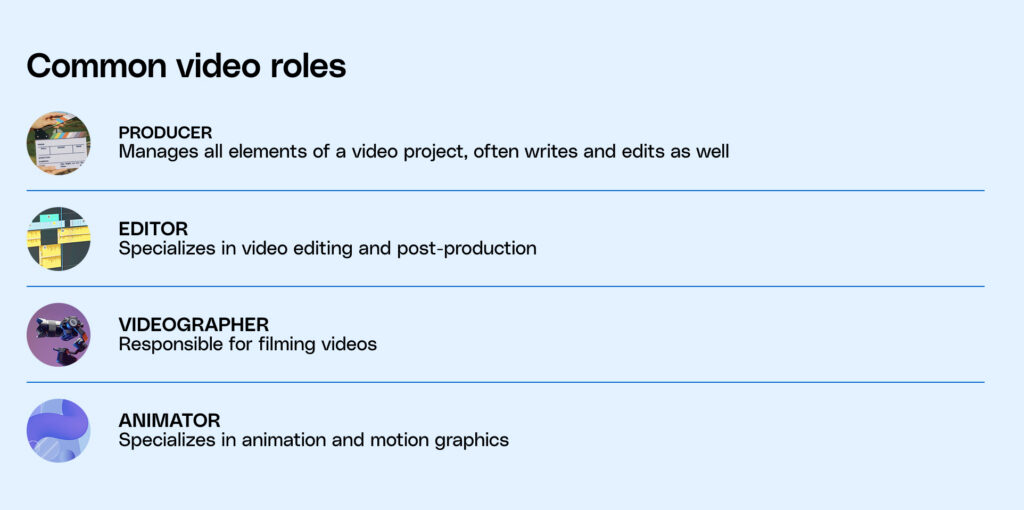
That’s why many teams start with a producer who can operate across both strategy and execution. This role brings structure early on—translating business priorities into video ideas, managing projects end to end, and contributing directly to production when needed.
Instead of hiring for a single specialization, you’re hiring for someone who can connect the dots across the entire process. They can scope projects, align stakeholders, and ensure each video has a clear purpose before production even begins.
As Rossi puts it, “I think a producer who has some hands-on technical experience is a great place to start. Someone who’s organized and can work on the strategic side. Someone who has experience with audience research and writing can then execute things like recording and editing.”
This kind of hire sets the foundation for everything that follows. They create early workflows, establish quality standards, and make it easier to scale the team over time without losing alignment.
Design the role around your video needs and business goals
Before you hire, get clear on what your team actually needs from video. The types of videos you plan to produce regularly will shape the skill set you should prioritize.
For example, a software company producing product tutorials and feature updates may benefit from someone with strong editing or animation skills. A team focused on events or interviews may need someone more experienced in shooting and on-location production. Understanding your most common use cases will help you make a more informed decision.
It’s just as important to define what success looks like for video inside your business. Are you trying to support product adoption, drive leads, build brand awareness, or a combination of all three? The answer should guide how the role is structured and how that person operates day to day.
Without that clarity, even a strong hire will default to producing content without a clear impact. The role needs to connect video output to business outcomes so that each project serves a defined purpose.
Hire for range, not narrow specialization
Early on, your video team will likely consist of one person. That influences what the role needs to cover.
As Nichols explains, “When you’re working with external vendors, they have a team of people, many of whom may only focus on editing or producing. But when you hire somebody in-house, it’s just one person. So, you need somebody who is well-rounded and driven to learn more.”
Beyond technical ability, this person also needs to manage projects, communicate with stakeholders, and adapt as priorities shift. The role requires someone who can move between different types of work without losing momentum or clarity.
Hiring for range gives you flexibility in the early stages. It allows your team to take on a wider variety of projects while you learn what to prioritize and where to specialize over time.
Set the role up to work across the business
Once you’ve made the hire, the next step is deciding where that role sits within your organization. This decision shapes how your video function connects to the rest of the business.
Start by looking at the types of videos you plan to produce most often, and the teams that role will need to collaborate with. If your focus is on social content and campaigns, it makes sense for the role to sit within marketing. If your work leans more toward brand, design, or internal communications, a different placement may be more effective.
As Rossi puts it, “If you operate a creative service that addresses needs across the company, embedding them with a design team may be the right move. For us, our video team sits under the marketing organization because that’s our primary focus. Essentially, it’s about evaluating your org structure and who the video team will need to partner with to ensure that your creative and strategic minds can collaborate effectively.”
At the same time, video rarely belongs to a single team. Most organizations use video across marketing, communications, product, and other functions. Your hire should be able to move between these teams based on business priorities.
Give the role and the workflow time to settle
A new hire changes how video requests come in, how projects are prioritized, and how work moves from idea to delivery. Those shifts in internal processes take time to stabilize. It’s better to start with a simple structure and refine it as you go rather than trying to design a perfect system from day one.
As Nolan Nichols explains: “It’s also important that the supervisor gets a feel for the feedback process. They need to know how long it is and the proper steps and channels. Don’t load everything onto the new hire and the existing team all at once. Start small, pick up early wins, and then scale up.”
The same applies to expectations around output. While an in-house hire will eventually increase your team’s capacity, that ramp does not happen immediately. Your hire needs time to understand the brand, the workflows, and how different teams operate.
“With somebody in-house, you will be able to produce more videos but avoid putting too much on their plate at the beginning. Be prepared for a few hiccups. You can’t necessarily go from zero to a hundred in a week. But following a couple of months of learning about the brand and people’s expectations, it should run smoothly,” adds Nichols.
Giving both the role and the workflow time to settle creates a stronger foundation. It helps your team to build processes that support consistent output without creating unnecessary pressure.
How small video teams scale output without chaos
Small video teams struggle when every request is tagged “urgent” or “important” and turns into a stand-alone project. And as volume increases, new workflow bottlenecks appear. The problem shifts from production to coordination—what gets made, when, and why.
Without a clear system, teams spend more time reacting than creating.
High-performing teams solve this by standardizing how work flows through the system. Every video starts with the same inputs, moves through the same stages, and ties back to a defined goal.
Here’s how to start.
Set goals before you execute on projects
To avoid overwhelming your team, set expectations early on by only allowing essential video requests. Consider creating a triage system to help manage priorities.
For example, a team prioritizing product adoption might focus on tutorial videos and deprioritize brand campaigns. Without that clarity, both requests compete for time—and neither gets done well.
Clark says, “I get requests from all parts of the business. It’s a matter of being able to prioritize things properly. I try to set realistic expectations, so I’m not overpromising on a due date. It’s important not to overpromise and set expectations from the start. Always ask yourself, how long is this really going to take?”
Create a gatekeeping system to manage expectations
You need a gatekeeping system in place to determine which video requests go through to your video team and take priority. Instead of asking your team members to determine priorities or, worse, take on more than they can realistically complete within the timeframe, choose a key stakeholder to act as the gatekeeper.
Your gatekeeper will have the final word on what videos get made. They’ll also help your team prioritize work so milestones get met and deliverables are on time.
“Who is the person that calls the final shot? Who’s going to take responsibility for what happens? It may be the CMO, it may be a VP of marketing, but that person needs to be the one who says, ‘I’ve heard everyone’s opinion. This is the direction we’re going.’ You need someone where the buck stops, someone you trust to make that decision,” says Ron Dawson, Content Lead at Replit.
Keep stakeholders aligned from start to finish
The success of any video production team––large or small––often boils down to how strong the communication is between your team and the rest of the organization. Weak or inconsistent communication can derail projects, causing missed deadlines and misaligned creative visions.
Building a foundation of effective communication involves prioritizing regular check-ins and clear, concise reporting at every production stage. This ensures everyone, from the director to the client, is aligned and informed, minimizing the risk of errors and maximizing team productivity.
“I prioritize good communication with my supervisors and let them decide what’s important, what projects get greenlit, and what projects aren’t necessary,” says Nichols. “When you have an in-house videographer, every department will say, ‘Oh, we have an in-house videographer; let’s make a video.’”
Create project management templates for your team’s process
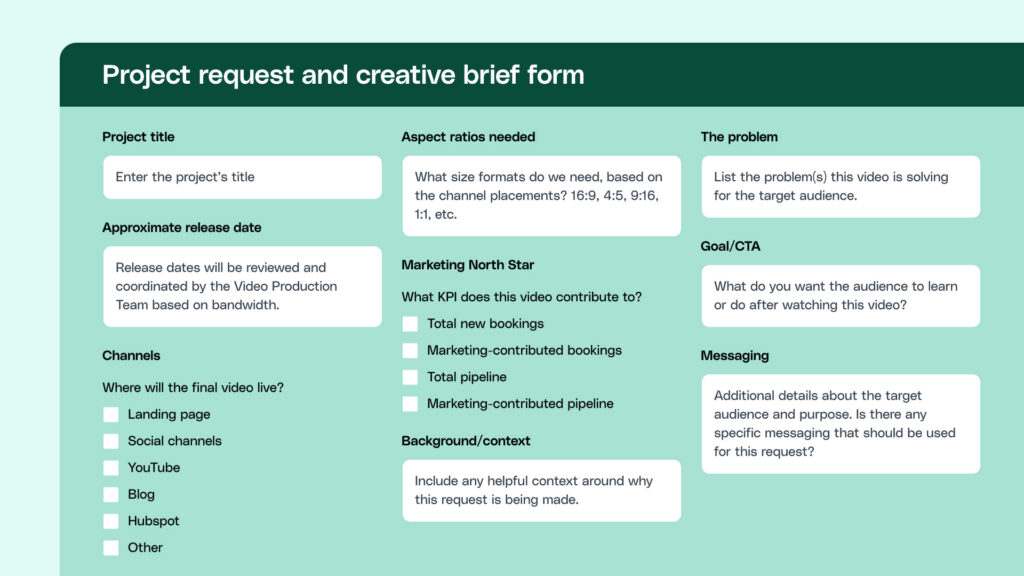
The Storyblocks video team has spent years refining our process for managing and prioritizing multiple projects. So to help your team get started, we’re sharing some examples of what we use to collect project requests, create briefs, and manage project timelines. They’re essential for a small yet mighty video production team to get everything done.
Combined with everything in our Video Strategy Guide, use these examples to create your own templates to build out the components of your video production timeline. Feel free to use these as a guide and adapt them to suit your team’s requirements.
Here is the form we use to collect project requests and create briefs.
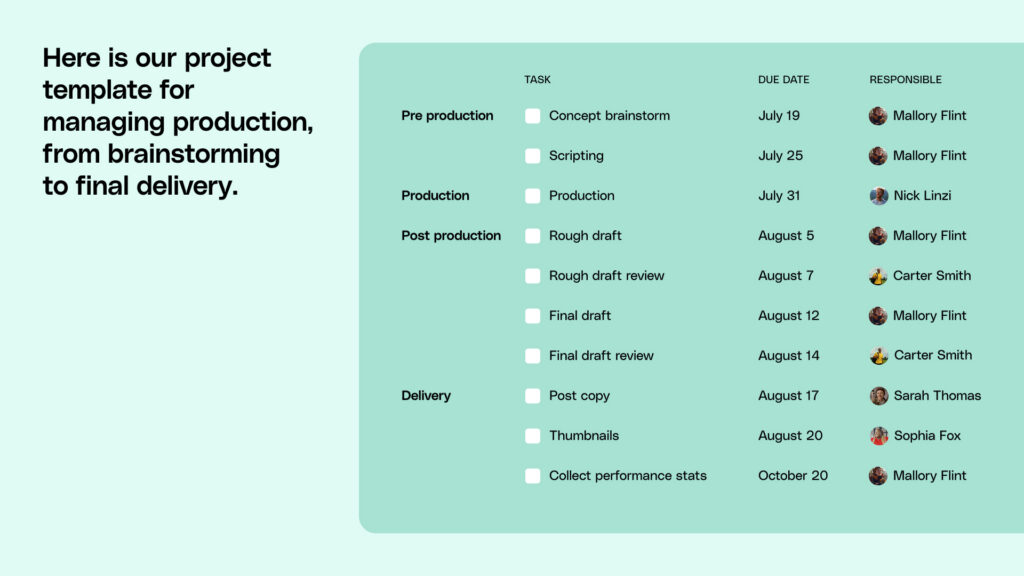
Here is our project template for managing production, from brainstorming to final delivery.
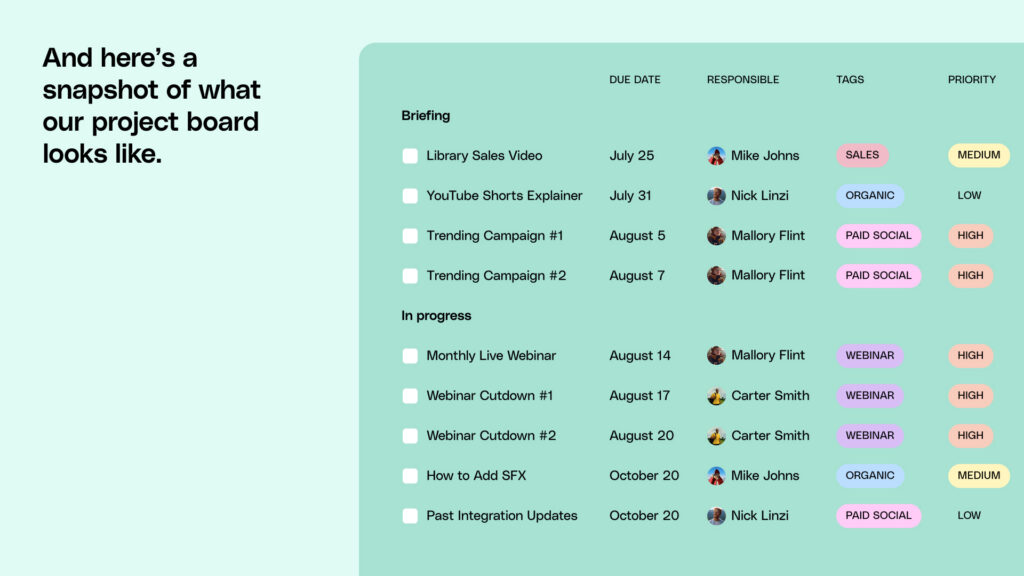
And here’s a snapshot of what our project board looks like. Here, we assign project roles, deliverables, priorities, and any other important elements that are important to see at a glance.
At a glance, stakeholders can quickly see key timeline expectations, and team members working on the project know who’s responsible for each piece, when each deliverable is due, and key milestones.
Build in buffer time for your video team
Always anticipate the unexpected when scheduling shoots, edits, and final cuts. Buffer time is important not just for technical setups and breakdowns, but also for creative adjustments and unforeseen challenges when it comes to your production timeline.
Allocating extra time reduces stress for your team and enhances the quality of the final product by allowing your videographer to work without feeling rushed. This proactive approach can save costs by avoiding overtime charges and rushed decisions.
“Don’t make the runway too short with projects. Give your videographer some time,” suggests Nichols. “Early on, they need that time to get used to the branding and how things work. I like to give myself more time, at least another day or two, and then I overdeliver if I can get it done quicker. Then there’s the bonus that sometimes the extra time helps me think creatively and do things differently. You don’t want to get into the trap of just getting something done just to get it done. You need time and space to think creatively.”
Essential investments for your team
It’s easy to overinvest in equipment early on. What you need depends on the type of video you’re producing and how your team works day to day.
Before making any purchases, map your most common use cases—whether that’s events, tutorials, interviews, or social content. That context should guide what you prioritize and what you can hold off on.
We’ve outlined example setups across different budget ranges to give you a starting point. Use them as a guide, and then adapt them based on your team’s workflow and preferences.
Here’s how those needs typically translate across budgets:
Before you sink most of your budget into camera equipment, don’t forget your editing needs. After all, the right editing software matters just as much (or more) than video and audio equipment. Be sure to evaluate software costs and include them in your team’s budget.
If you already have a video editor on your team, check in with them to see if they’re happy with their current editing software setup or if they’d rather use different software. Consider providing an annual budget that allows them to experiment with and choose the right software for their specific use cases.
Splurge on the equipment you’re most likely to use regularly
Getting caught up in purchasing the newest and most advanced camera model is easy. But splurging on the latest camera might not be what your videographer actually needs.
Alternatively, investing in the best camera your company can afford makes sense if you plan on doing a lot of filming.
If you have a videographer on your team, make sure to ask them about their needs and preferences before investing in equipment. They’ll know what they’re most likely to use. Plus, they’ll likely have experience with different makes and models and know what will work best for your needs.
Nichols says, “If you’re doing a lot of filming, then you need to do a lot of research. Figure out your budget and the quality of the camera you can get. Cameras are costly, so it’s a process of figuring out your budget and what you can get that’s high quality that fits underneath that.”
How to build a tech setup that scales with your team
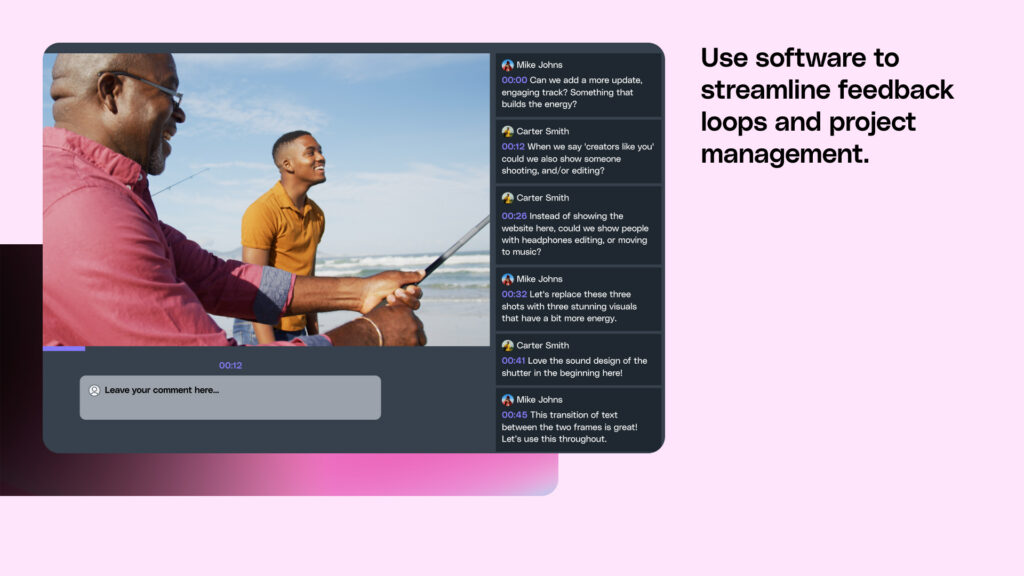
Use software to streamline feedback loops and project management
Once you’ve defined your review and feedback processes, think about what software will make your team the most efficient in giving and receiving feedback.
Software that lets you annotate videos with comments can reduce back and forth and make it easier for video editors to implement changes. Stakeholders and leadership also need to use software that makes it easy for them to share feedback.
As your video production team evolves and you produce more videos, your project management and feedback loop processes may need to change. It’s important to review your processes regularly and look for ways to improve them.
Rent equipment to figure out what works and lower costs
Investing in state-of-the-art equipment from the get-go isn’t always the answer. Sometimes, the budget isn’t there, or you’re unsure which equipment your team needs. For those situations, renting equipment can be a great option.
Plus, with new makes and models constantly evolving, your team may need to invest in equipment multiple times.
Even if you’ve already invested in some equipment, renting is a great way to determine what your team wants to purchase next. It’s a low-commitment way to figure out what works best for your team.
“If I had to go back and start again, I probably would have rented more equipment. I wish I’d known how many video equipment rental agencies there are. Renting can also give you a better idea of what you want. You can buy any equipment you’re likely to use regularly, but it makes sense to rent anything you’re unsure about, ” says Nichols.
Renting equipment is also a great way to test the waters with different models and cut costs before you know your exact video needs.
Instead of putting all your budget into one state-of-the-art camera or microphone, you can test different brands and see what makes the most sense for your specific needs.
“Renting makes sense for equipment you might not have the capital budget to purchase but will need from time to time,” says Nichols. “You could find rental services where you can rent that specific equipment. Let’s say you’re working a conference, and you can just budget the conference to have $1,000 or $500 set aside for video equipment. You could use that to rent the needed equipment, but you don’t need to put down $15,000 to own it.”
Introducing Storyblocks
There are many time-consuming, expensive, and risky aspects of video production where the results are not worth the investment. Like when you crash your drone into the ocean trying to get that coastline aerial shot, blow your budget traveling to a location only for it to rain the entire time or spend days tinkering with graphics that ultimately end up on the cutting room floor. And we won’t even get into all the ways equipment can break unexpectedly.
“Filming in a busy city street with a camera can often lead to troublesome situations. I’ve experienced plenty of this myself. For example, capturing simple traffic shots can feel like you’re risking your life for a minor part of a project.
In such instances, I find it more practical to use stock footage instead of putting myself in potentially hazardous situations. Whether it’s footage of a semi-truck on a highway or something similar, the question arises: Should I risk standing in the middle of a highway, or is it smarter to use a safer alternative? For me, choosing stock footage is a no-brainer to avoid unnecessary risks for what might seem like a trivial aspect of a job,” says Clark.
Storyblocks offers unlimited stock media, commissions content based on customer demand, and covers you legally—all for under one subscription plan. Our thoroughly vetted contributing artists do the meticulous work to create the highest-quality lifestyle, aerial, location, nature, and other video so you don’t have to.
Storyblocks helps you find ultra-specific video clips
With Storyblocks, you’ll gain access to an extensive video library of over 6 million very specific video clips. There’s everything from people rushing through Shanghai to Icelandic waterfalls and people jogging through the park. And that’s just the tip of the iceberg. You name it, and we’ve got it.
“Before I subscribed to Storyblocks, I often needed a specific shot but wouldn’t know how to find it,” says Clark. “Like most videographers, I’d have a few options that weren’t ideal; I could steal it from online somewhere or try to recreate it, which, a lot of times, for a myriad of reasons, I couldn’t do it. For example, recreating a city skyline shot or drone footage wasn’t possible. Many times throughout my career, I would sit and try to figure out how to cover this stupid edit. Now, with Storyblocks, I can just go and find ten shots and figure out which one works the best.”
Our unlimited library is over 6 million strong (and growing)
With a Storyblocks subscription, you’ll get access to all the stock assets your team needs to create amazing videos quickly. Our library has new content added daily, and we prioritize adding the content you want to see based on the search terms our members use so we can fill in any missing gaps. Plus, our AI Toolkit gives you more ways to customize the footage in our library or create professional-sounding voiceovers.
On top of 8K, 4K, and HD footage, you’ll get access to exclusive music tracks from award-winning artists, pre-made templates for the most popular editing software, sound effects, images, and more.
I knew we needed Storyblocks from day one –– we needed a complete library of material to draw from. I appreciate that the team always adds new videos and diversity; it’s not just a one-time library, it’s always evolving.
Nolan Nichols
Manager of Video Production at U.S. Travel Association
Using our plugin for Adobe Creative Cloud, you can search, preview, and download assets from the Storyblocks library without leaving your editor, saving you valuable time.
Quickly access saved content directly in your editors, making it easier to source the right assets for your video. Use custom templates or music recommendations to find inspiration and kick-start any project.
You get legal rights to the footage, too
When you use Storyblocks, you’re covered. You get to use legally licensed footage that protects you from copyright issues. Plus, our customers enjoy long-lasting, top-notch legal protection—no worries, ever.
“We have the rights to that footage, whether it’s a Super Bowl commercial or a Twitter campaign. Since we’re an association with members, we can also send footage to them and say, ‘Hey, as long as you give us source credit, we’re covered under that legality, too,” says Nichols.
You never pay per digital asset or get cornered by limited credits
Say goodbye to limited credits that force your team to ration the amount of stock footage they use.
Our flexible subscription plans scale to give you access to an unlimited library of high-quality stock options with downloads that fit your workload for one flat price.
“I love Storyblocks’s flexibility, letting me experiment with various video footage whenever I like. The plan is great because I can use what I need, when I need it, and apply the assets in any way I choose,” says Nichols.
“Storyblocks lets me test and experiment with different video footage. The plan allows me just to take what I want whenever I want. I love having the flexibility to use the assets in any way I want, whenever I want,” says Clark.
Next steps
Hopefully, this guide has given you everything you need to help your in-house video production team run smoothly.
As you start applying what you’ve learned, these guides can help you go deeper into specific challenges your team will likely face next.
Authenticity in the age of generative AI: Understand how global teams use AI in their video workflows without compromising quality, trust, or your brand’s voice.
Debunking 9 common video marketing myths:Cut through common misconceptions about video so you can make smarter decisions about where to invest time and resources.
Ready to equip your in-house video production team with Storyblocks? Get in touch to empower your team to reclaim creative control and access all the resources they need for quick and top-quality video creation.