Video editing is exploding as both a hobby and a career, but picking the best video editing software for beginners can slow your momentum. With thousands of platforms out there, it’s easy to feel overwhelmed.
Some editors are very simple, with easy interfaces that get you straight into cutting. Others are more complex, but offer more room to grow and produce high-quality content.
For beginners, the best options hit a sweet spot between ease of use, powerful features, and affordability. Your choice depends on whether you want to develop your skills right out of the gate, or jump straight into basic editing without the learning curve.
In this article, we’ll cover which video creation tools for beginners are easiest to learn, and which ones scale with you as your skills improve.
The best video editing software for beginners
Before diving into the top picks, let’s look at what makes an editing app truly useful for new users. We judged these tools based on four factors that matter most when searching for a reliable beginner video editing software:
- Ease of learning: We looked for clean and intuitive interfaces where the tools make sense right away. A great starter app usually has drag-and-drop editing and helpful templates to get you up and running fast.
- Included assets: Software that comes loaded with assets like quality stock video, music, and motion graphics gives you a massive head start.
- Room to grow: We favored software that lets you scale your skills. They offer advanced features like color grading and audio mixing that you can tap into as you get more comfortable.
- Price: Budget is a huge factor when you are testing the waters. We weighed what you get for your money and focused on affordable options that make sense for new creators.
With that out of the way, let’s take a look at the top five editing platforms for beginners.
1. Storyblocks Maker – Best for fast, simple video creation
Storyblocks Maker is designed to make creating and editing videos as easy as possible. As easy video editing software for beginners, it helps you produce polished videos without having to learn complex editing techniques from scratch.
The entire workspace lives directly in your web browser, meaning there is no heavy software to download or update. Because of this, it works on both Mac and PC.
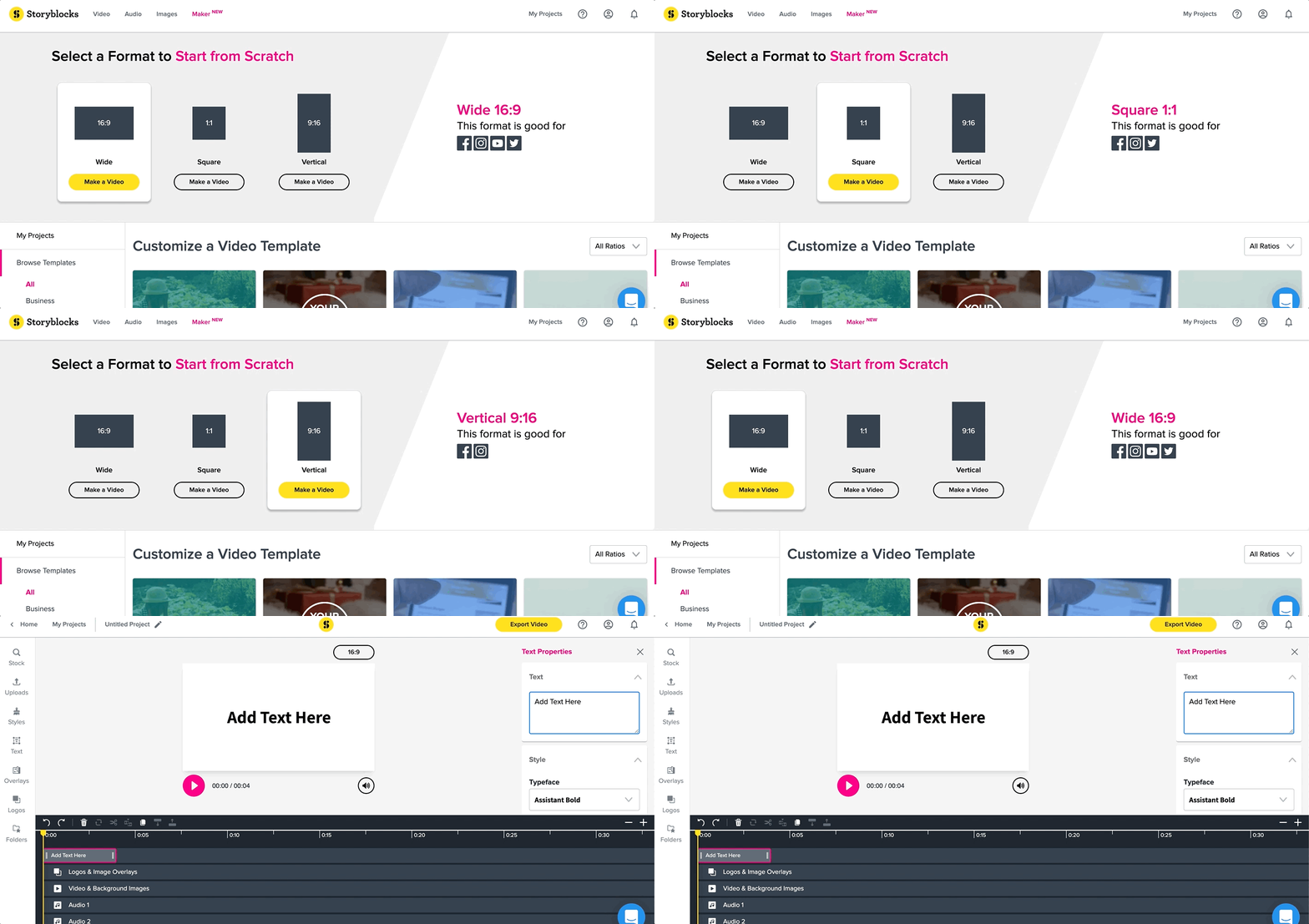
The layout is very clean and easy to navigate. You have a media search panel on the side and a timeline at the bottom.
Simply find the clips, music, or graphics you want and drag them right into your timeline to start building your sequence.

The key benefits of using Storyblocks Maker:
- Get instant access to pre-made templates for easy editing
- Drag-and-drop your files and edits with pre-built animations, overlays, and more
- Export quickly for social media
- Use pre-made formats for every common aspect ratio
- Get built-in recording software for screens, webcams, or audio
You also get direct access, right in the editor, to search and add from Storyblocks’ library of over 6 million stock footage, music, images, and more. As a beginner, this means you’ll save hours of hunting for assets on other websites. Check out our intro guide to get started.
This tool is incredibly useful for marketers, social media creators, and small business owners making promotional videos. It gives you everything you need to build content and get your message out faster. Because its simple design focuses on quick and easy solutions, there is naturally less room to grow into advanced technical editing skills over time.
Cost: Included for free with any Storyblocks membership.
2. CapCut – Best free editor for social media creators
CapCut is a favorite among content creators thanks to its mobile-first editing workflow and TikTok friendly features. It has a minimal learning curve, making it easy to pick up and start using right away.
The interface is designed for vertical video, making it arguably the best video editor for beginners focusing on social media. The workspace highlights essential tools front and center so you can add trending audio or text effects with just a few taps.
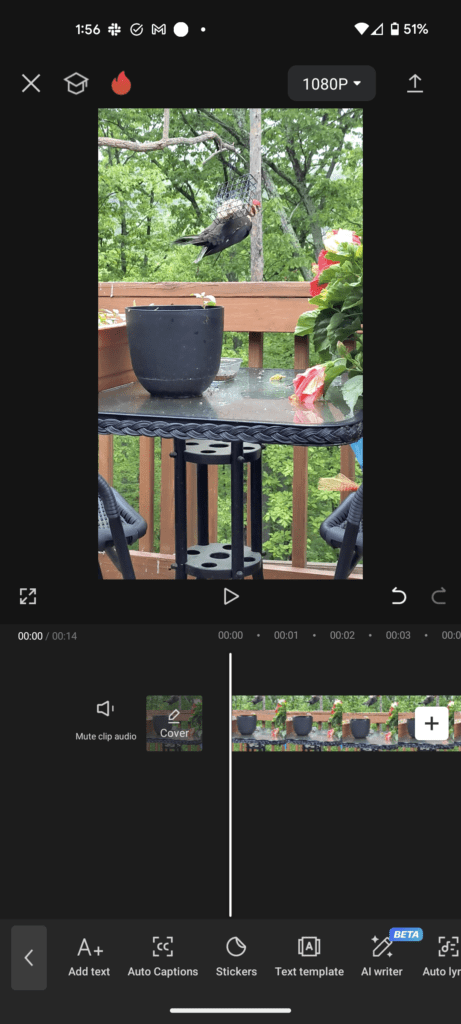
The key benefits of using CapCut include:
- Access to essential editing tools with advanced features you can unlock with their paid plans
- Transitions, effects, and AI tools, including background removal and auto-captions
- A basic asset library with music, SFX, stickers, and fonts
- A wide range of templates that port easily over to TikTok
- Multi-device workflows across mobile, desktop, and web – and you can jump between mobile video editing and the desktop version with no hiccups
If you’re focused on vertical video for platforms like YouTube and TikTok, the app is basically built to help you turn around engaging content fast. The simplicity does come with a ceiling, and since core tools are automated, you won’t find much of a chance to learn high-end editing techniques down the line.
Cost: Free to download and access basic features. Has two additional paid subscription plan tiers that unlock the rest of the app.
Want to learn CapCut? Check out our in-depth overview and intro tutorial.
3. iMovie – Best starter editor for Mac users
If you’re already working on an Apple device and want a no-frills way to assemble your footage, iMovie is one of the easiest options. It strips away the clutter and gives you the essential tools required to start creating.
With a simple design, you get a clean workspace with intuitive drag-and-drop timeline editing, meaning you can move through your project quickly.
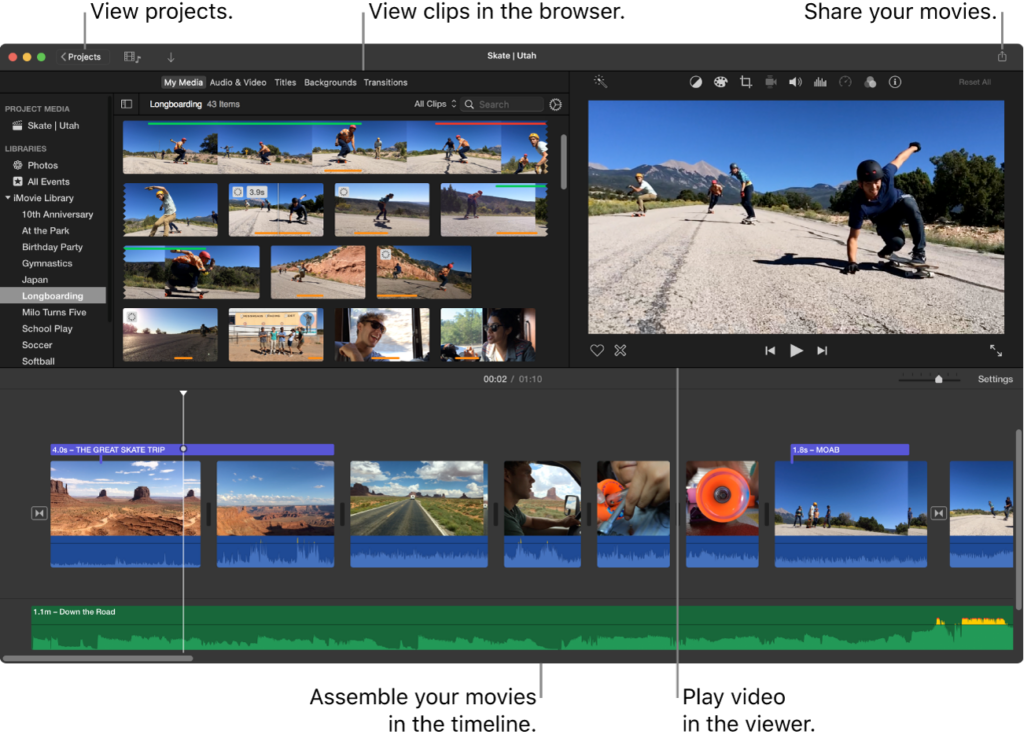
Here’s what stands out with iMovie:
- It’s easy to start using right away and learn quickly
- It has a clean interface with simple drag-and-drop timeline editing
- You get a fast workstream, but with limited functionality
- You can access some built-in templates and trailers
This setup is perfect for students, casual creators, or anyone who just needs to cut a quick home video together. The tradeoff for that simplicity is a lack of advanced features, meaning you will likely outgrow the iMovie software as your skills develop.
You should also be aware of a slight quirk with how projects are shared. While you can send a project file from your iPhone to your Mac, it does not work the other way around.
Cost: Free and included by default on Mac and iOS devices.
4. Adobe Premiere Pro – Best editor to grow with
Premiere is one of the most widely used video editing programs for professionals and hobbyists alike. It receives regular updates with new tools added constantly to match industry demands.
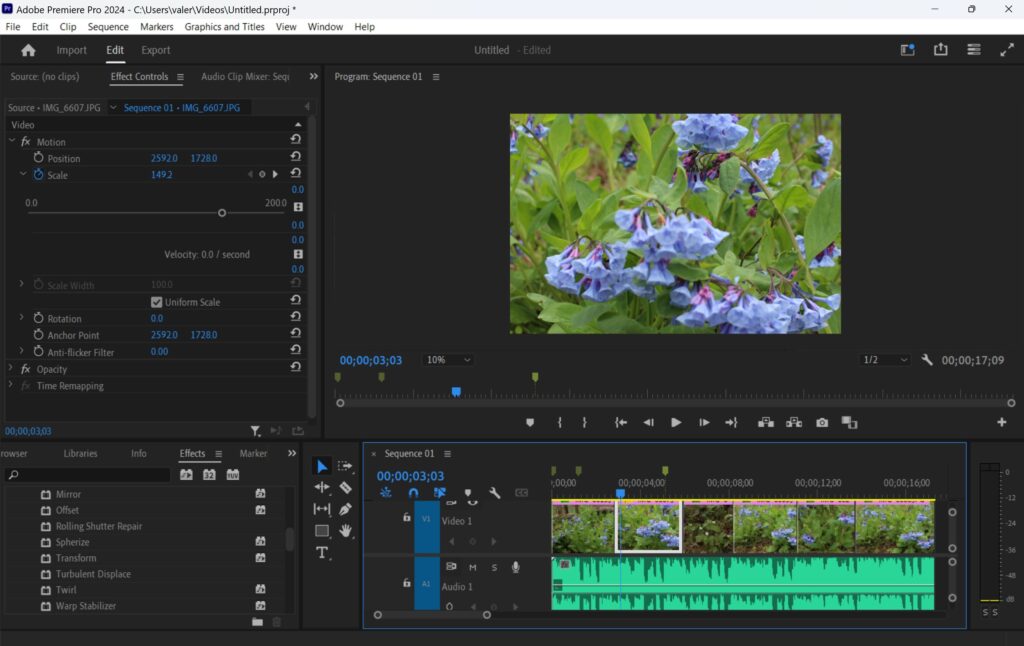
The workspace is highly customizable. You have the freedom to arrange different panels for your timeline, media pool, and color correction exactly how you want them. While it might look intimidating at first glance, the layout becomes very logical once you start building out a project.
Here’s what Premiere brings to the table:
- When it comes to video editing, it’s the industry standard
- All the essential tools, plus more advanced features to level up your skills as you learn
- Tons of presets, templates, automation, and AI tools to speed up and simplify workflows
- Huge ecosystem of tutorial content to help you learn along the way
- It’s part of the larger Adobe Creative Cloud and integrates seamlessly with other Adobe software like After Effects and Photoshop
There is a learning curve when you first open the app, but picking up the basics is not terribly difficult. The initial time investment pays off massively as you begin utilizing the full power of the software.
Because of this, it’s best for professionals, serious hobbyists, and creators who make content for a range of platforms. The biggest hurdle for beginners is usually the payment model, as there’s no way to buy the software outright. You’ll also struggle to run Premiere Pro on a student laptop or older PC, so keep in mind what hardware you’re working with.
Cost: Paid monthly or annual subscription, which adds up over time.
Note: Keep in mind that if the Premiere Pro option is too heavy for you, there’s also Adobe Premiere Rush. Rush is a mobile-friendly app for on-the-go editing, and it’s very beginner-friendly.
5. DaVinci Resolve – Most powerful free video editing software
DaVinci Resolve made its name as the industry standard for color grading, but it has since evolved into what is widely considered the best free professional editing software available today.
The workspace handles the editing process a bit differently than other programs. It’s divided into dedicated tabs for each step of post-production. You move naturally from the cut page to the main edit timeline, over to color correction, and finally to audio delivery, keeping projects manageable.
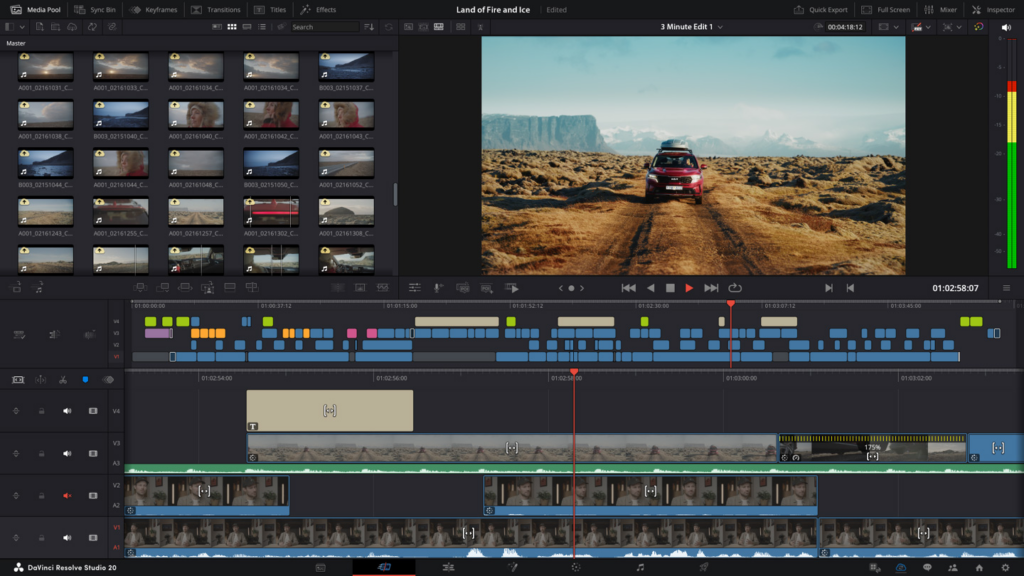
The key benefits of DaVinci Resolve are:
- An advanced editing timeline separated into dedicated production pages
- Hollywood-level color grading tools
- Powerful visual effects and motion graphics capabilities
- Professional-grade audio mixing tools
- AI-powered features built in to speed up your workflow
DaVinci Resolve is for filmmakers leveling up their production and anyone serious about learning professional editing. If you want top-tier color grading and audio tools without paying a monthly subscription, this is your best option.
That power comes with a very real learning curve. The interface works differently from basic editors, and new users often get tripped up by the node-based color and effects panels. It can feel intimidating at first glance, and the software also requires a fairly powerful computer to run smoothly.
But if you have the right hardware and the patience to learn how to use Resolve, it’s easily one of the most capable tools on the market. It outperforms a lot of expensive paid software once you master the workflow. Learn how DaVinci Resolve stacks up against Premiere Pro.
Cost: Free to download. The free version has everything most creators need. The paid version, DaVinci Resolve Studio, requires a one-time fee and unlocks advanced tools for professionals.
How to choose the right video editor for you
Narrowing down the best beginner video editing software for you comes down to your needs. Before you download anything, ask yourself these four questions to find the best fit:
- What type of videos are you making? Are you shooting quick vertical clips for TikTok and Instagram Reels, or longer marketing videos and short films? If your focus is social media, an app that lets you film and cut directly on your phone is a massive advantage. For heavier projects, you’ll want a traditional desktop setup.
- Do you want to get started fast, or long term growth? Be honest about your timeline. If you need a video published by tomorrow, look for software with templates that do the heavy lifting for you. If you plan to make editing a core part of your career, it’s worth tackling a steeper learning curve now to master a more powerful program.
- What’s your budget? There are highly capable free options available today. But, paid subscriptions bring convenience, like stock assets, automated tools, and cloud storage. Decide what makes sense for your wallet right now.
- Are you more interested in creating content, or learning the ins and outs of video editing? This is the ultimate deciding factor. If your main goal is simply getting your message out to an audience, stick to apps that let you edit quickly and hit publish. If you are fascinated by the craft itself, like color grading and sound design, you’ll want a professional tool that gives you total control over every frame.
The best video editing software depends on your goals
Whether you want the lightning-fast workflow of Storyblocks Maker, the mobile-first social tools of CapCut, or the simple Mac ecosystem of iMovie, there’s an accessible starting point for everyone.
On the other hand, if you are ready to tackle a steeper learning curve, Adobe Premiere Pro and DaVinci Resolve offer the industry-standard power and color grading you need.
Elevate your edits with Storyblocks
No matter which software you decide on, using high-quality assets is the easiest way to elevate the production value of your videos without having to put in hours of extra work.
If you decide to go with Adobe Premiere Pro or DaVinci Resolve, Storyblocks can help. We have thousands of pre-built templates for both platforms, so you can drag and drop professional animations and effects straight into your timeline.
With a Storyblocks subscription plan, you unlock unlimited downloads of those templates, plus 8K, 4K, and HD footage, royalty-free music, motion graphics, and more.