Repurposing long-form to short-form content works on a simple principle—you take content you’ve already made and get more out of it by sharing it in a format that works better on social platforms.
But what does that process look like in practice? Which moments from a longer video are worth turning into a clip, and which ones won’t land without the full context?
In this post, we’ll explain how to make a long video into short clips. You’ll learn how to identify the moments in your videos that work as standalone short-form content, and how to build a process for clipping that gets better results over time.
Why repurpose long form to short form content at all?
Taking something you’ve already made and reformatting it for a different platform or audience has become a standard part of most creators’ and marketers’ workflows.
The reason for this evolution in short-form content is straightforward: it gets more reach out of content you’ve already invested time in, without requiring you to film something new every time you need to post.
In fact, according to ReferralRock, 94% of marketers repurpose their content because it actually outperforms both creating new content and updating existing content.
For anyone who posts regularly, this matters. Staying consistent on social media is easier when you’re not starting from scratch every time. One long-form video can generate content for multiple platforms, like:
- Two or three short teaser clips
- Individual tips or takeaways you can post separately
- A strong quote pulled for a text or graphic post
- Experimental versions of the same moment with different hooks or framing
- Behind the scenes or outtake content
Converting a long video to short videos gives the content a longer lifespan. A video posted once reaches whoever saw it that day. The same video, broken into clips and posted across several weeks, keeps your audience engaged.
How to choose the parts of your video worth clipping into short form
The most important question to ask about any moment you’re considering clipping is: would this make sense to someone who has never seen the full video?
If the answer is no, it’s not ready to be a clip.
Beyond that, here are a few things that work well as clips and some that you’re better off skipping:
| Clip it | Skip it |
| ✅ Hooks that land within the first 2 seconds | ❌ Moments that only make sense mid-video |
| ✅ A complete thought with a clear beginning and end | ❌ Inside references the audience won’t have context for |
| ✅ A surprising or emotional beat | ❌ Tangents that don’t resolve on their own |
| ✅ A question followed by its answer | ❌ Anything that pays off only after watching the full video |
| ✅ A quotable line | |
| ✅ A strong visual moment |
Sometimes you can structure your long-form content to make this process easier from the start. The Storyblocks video team recently produced a video covering eight lessons they learned in eight years of video marketing. Each lesson worked as its own standalone clip, so the team also posted them individually as short-form content.
Watch the full video here:
Not every video will break down from long to short video that cleanly, but it’s worth keeping in mind when you’re planning long-form content. Structuring it in self-contained sections makes the clipping process a lot simpler later.
Once you identify those standalone moments, you can stretch them even further through testing and level up their production value to hold viewer attention.
Test variations with one section and multiple clips
You don’t need completely different source material for every new post. You can take a single 30-second section and turn it into three distinct clips just by changing the hook, captions, framing, or pacing.
Try cutting one version that starts immediately with a bold statement. Create a second version that uses a tight crop to change the tone. Build a third version with heavy text graphics to catch viewers watching on mute. Consider the perfect video length for each platform that you’re going to post to—for instance, how would you create content for YouTube Shorts vs. Instagram?
Treat this process as low-risk experimentation. You’re not filming anything new. Post a couple of versions and see what the numbers tell you. Platforms reward you for figuring out what works, and A/B testing variations on existing content is one of the faster ways to do that while also helping you uncover your own editing style.
Leveling up short-form clips with stock media
Social media has changed how we tell stories in our videos. The problem is, you often need to cut short-form clips from footage that wasn’t produced with social media in mind, which means the raw material doesn’t always hold attention when it’s cut down.
B-roll helps. Dropping it over a slow moment gives viewers something to engage with while the speaker keeps talking. Sound effects work in a similar way, adding emphasis at the moments where you need someone to stay watching, like the opening seconds.
None of this has to come from the original video. Short-form is a good place to try narrative techniques that’re different from what you’d use in a longer piece, and adding assets on top of existing footage is one of the easier ways to do that.
When you have access to stock footage, music, sound effects, and motion graphics, you aren’t limited to what you capture on the day. If you’re doing this regularly, the Storyblocks library has over seven million clips, music tracks, sound effects, and motion graphics you can use across your projects.
And the Storyblocks plugin for Premiere Pro and After Effects takes it a step further by letting you search the library from inside your editor, so when you need a piece of footage or a sound effect for a clip you’re working on, you can find it and drop it in without stopping.
Using AI clipping tools—should you let them do the work for you?
While we’ve focused on making clipping decisions yourself, content creation tools like Autocut and Opus Clips have made it possible to hand a lot of that process over to AI software. They scan a video and pull out the moments that are most likely to perform well, which is useful when you have a lot of footage to get through.
Here’s a quick look at Autocut’s interface, showing how to turn a long-form video into short b-roll clips using its AI toolset:
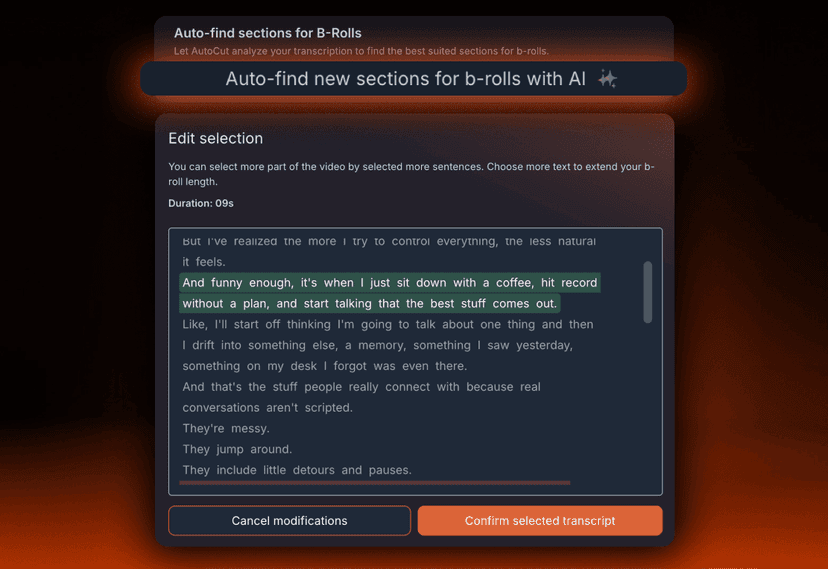
Autocut also integrates with the Storyblocks library, so if you do bring it into your workflow, finding stock assets to go with your clips becomes part of the same process.
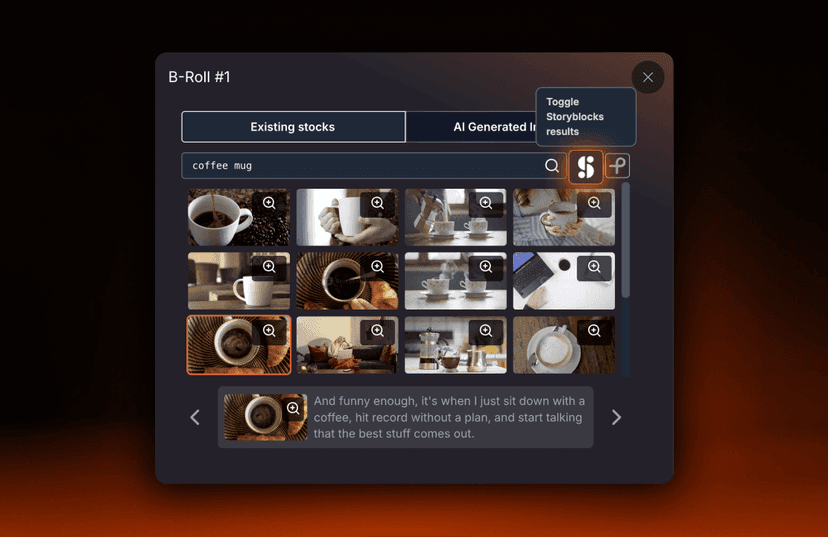
That said, if you’re new to short-form content, it’s worth doing this manually before using these tools. When you make the decisions yourself, you start to understand what your audience responds to, and you’ll spot moments that a tool might pass over.
Algorithms are good at identifying what performs across a lot of different content. They’re less good at understanding the context, tone, or angle that makes your content worth watching.
Once you’ve nurtured that understanding, tools like these are a lot more valuable. They work well for getting through a high volume of footage or doing a first pass on something long.
Find the standalone moments in your footage
Getting good at short-form content isn’t all about getting faster at editing. It’s about learning to watch your own footage differently and knowing which moments are worth pulling out and why. That gets easier the more you do it.
A good place to start is with a video you’ve already made. Watch it back and find a few moments that would make sense to someone who has never seen the full thing. You’ll probably find more than you expect.
If you’re ready to start editing those clips, a Storyblocks subscription gives you unlimited downloads of over 7 million human-made stock assets. Plus, the Storyblocks plugin for Premiere Pro and After Effects gives you access to the full Storyblocks library without leaving your timeline. It’s worth having open for your next short-form edit.