
Looking at YouTube Analytics can feel like trying to read a foreign language. All those graphs, yet you’re never quite sure which numbers actually matter for growing your channel.
Here’s the thing: most of those metrics are just noise. The real goldmine is in the handful of insights that tell you what your audience wants and how to give them more of it.
In this guide, we’ll explain which YouTube metrics move the needle and how to use your data to plan better content. Whether you’re just starting out or trying to break through a plateau, these strategies will help you turn YouTube Analytics into your secret weapon for growth.
Table of contents
- Understanding the YouTube metrics that really matter
- Which metrics are actually useful?
- How to use YouTube analytics at every stage of your channel
- Using analytics to guide video topics and formats
- Turning audience behavior into channel strategy
- Avoiding data paralysis: When to check your analytics and what to ignore
- How analytics can help you grow off-platform
- Final tips and mistakes to avoid
- Start creating better YouTube videos
Understanding the YouTube metrics that really matter
YouTube Studio throws a lot of data at you. Let’s take a look at the key metrics and what they tell you about your channel’s performance.
Reach metrics
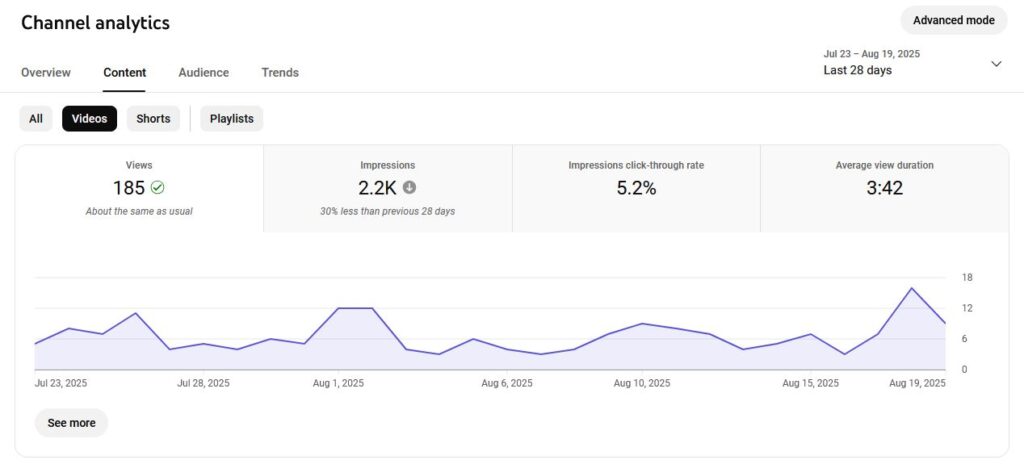
Reach metrics show you how many people are discovering your content and whether it’s compelling enough to get clicks. Look for these under Your channel > Analytics > Content. The two main reach metrics are:
- Impressions: How often your thumbnail appears on someone’s screen. This tells you how widely YouTube’s algorithm is spreading your content. If impressions suddenly drop, it might be because your recent videos haven’t been performing as well.
- Click-through rate (CTR): The percentage of people who click after seeing your video thumbnail. Typically, your CTR spikes right after you publish, then settles into a stable rate as your video goes beyond your core audience. A good CTR is 2-10%, but it varies a lot depending on niche and audience size.
Engagement metrics
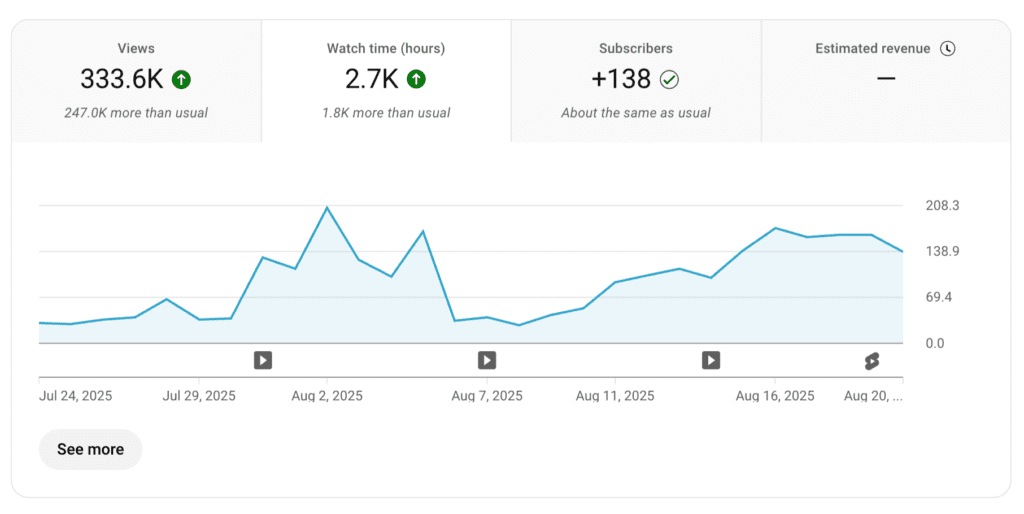
Engagement metrics show how well your content holds attention once people click. You can find these on your Analytics homepage. The key YouTube metrics to track here are:
- Watch time: The total number of minutes viewers spend with your videos. YouTube prioritizes content that keeps people on the platform longer. If your watch time is low, viewers probably aren’t finding your content engaging enough to stick around.
- Average view duration: How long the typical viewer sticks around. If this is dropping, your content isn’t matching expectations. Some creators, like Tymon Reynders, improve this by getting straight to the point: “We’re always focused on making the intro as short and impactful as possible, showing exactly what the video will cover right from the start. That way, viewers instantly know what they’re about to learn, if it interests them, they stay, and if not, they leave.”
- Likes, comments, shares: These show emotional engagement. High engagement signals to YouTube that your content creates strong reactions. Comments are especially valuable because they show people are invested enough to start conversations.
Audience metrics
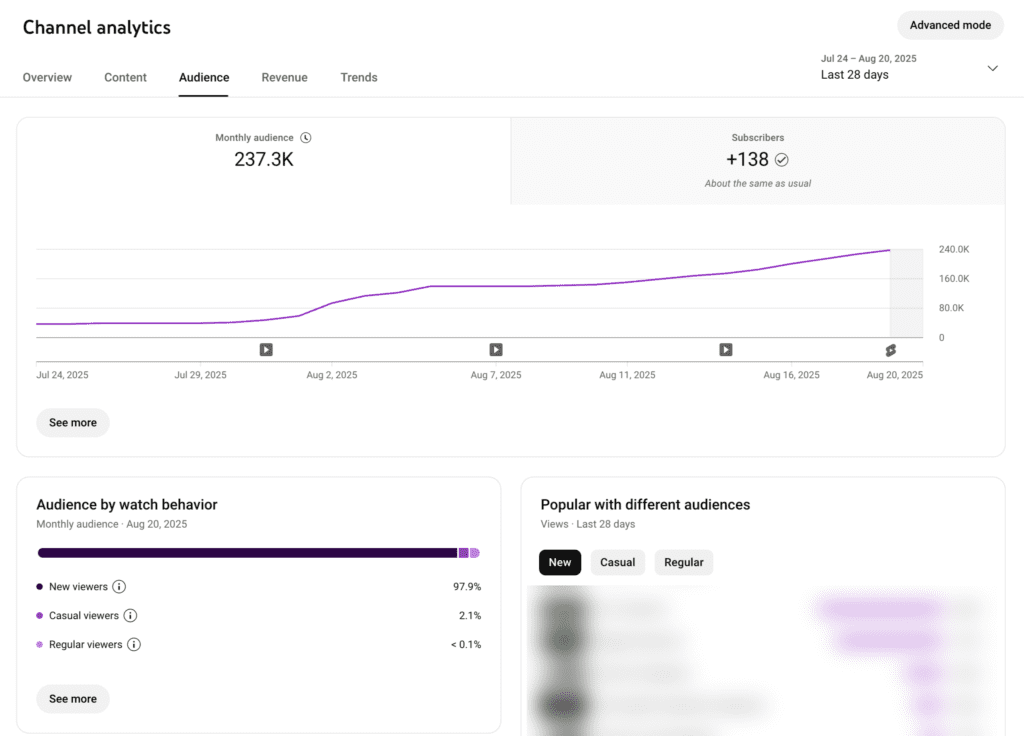
Audience metrics help you understand who’s watching and how loyal they are to your channel. You can find these under Analytics > Audience. The most important audience insights include:
- New vs returning viewers: Shows whether you’re attracting fresh eyes or keeping existing fans engaged. A healthy channel needs both. If you’re getting 90% new viewers, you might not be creating content that brings people back.
- Subscribers gained/lost: Reveals if your content is compelling enough to earn long-term followers. Look for patterns in which videos gain the most subscribers, since these topics are worth exploring further.
- Demographics: Age, gender, and location breakdowns help you tailor content to your actual audience. It can also reveal surprising insights, like discovering your gaming channel has a huge audience of parents looking for family-friendly content, not just kids.
Revenue metrics
Revenue metrics matter if you’ve monetized your channel, which is the goal for most creators. You can find these under Your channel > Analytics > Revenue. The two core examples are:
- RPM (Revenue Per Mille): How much you earn per 1,000 views after YouTube takes its cut. This typically ranges from $1 to 5 for most creators, but can vary wildly.
- CPM: What advertisers pay for 1,000 ad impressions. The gap between RPM and CPM is YouTube’s share. If your CPM is high but RPM is low, YouTube is taking a bigger cut (sometimes due to music licensing in YouTube Shorts).
These metrics are only available once you’ve started your earning journey with YouTube. To do so, you’ll need at least 500 subscribers, three uploads in the last month, and either 3,000 watch hours or 3M Shorts views.
Advanced metrics
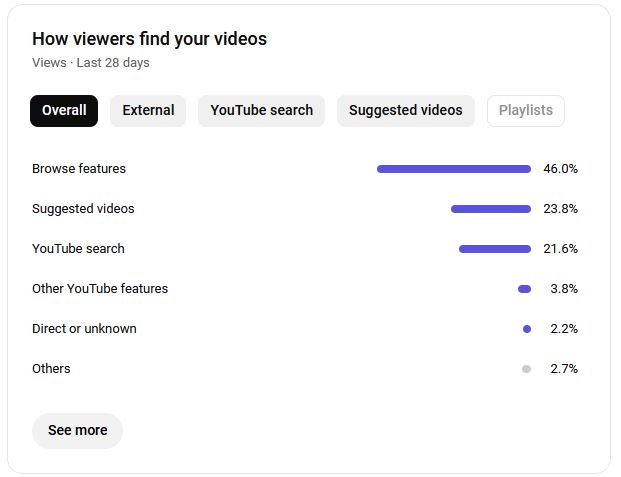
Advanced metrics help you see the bigger picture of how people find your content. Two metrics to keep an eye on are:
- Traffic sources: Shows where your views come from (YouTube search, suggested videos, external websites, or direct links). If most of your traffic comes from suggested videos, you’re benefiting from the algorithm. If it’s mostly from search, you’re doing well with SEO.
- Playback locations: Tells you where people watch your videos. This matters because you can design your content to match how people like to watch. For example, if you’re getting lots of mobile views, you might optimize for vertical thumbnails.
Which metrics are actually useful?
When you’re just starting out, it’s hard to tell what’s useful and what isn’t. A lot of what YouTube tells you is just vanity metrics that make you feel good (or bad), but don’t say anything useful.
The key is focusing on actionable metrics. These are the data points that show you what’s working and help you improve your channel’s strategy. Take views, for example. Hitting 10,000 views feels great, but it doesn’t tell you if people watched your whole video or bailed after five seconds.
In comparison, you can get real insights from the watch time metric. If your 10-minute video keeps people watching for 8 minutes, you’ve created something engaging. If viewers drop off after 2 minutes? Now you’ve got something specific to fix. Maybe your intro drags on too much or your content doesn’t deliver what the thumbnail promised.
These metrics become even more useful when you combine them to understand what’s happening. For instance, a high CTR but low view duration means your thumbnail’s doing a good job, but the content isn’t living up to it.
And it’s not just which metrics you track, but the time frame you analyze. Daily numbers fluctuate. Your video might get 500 views one day and 2,000 the next for reasons you’ll never figure out. It’s the weekly and monthly patterns that show you what’s working. If your retention rates climb for three weeks, it’s telling you something important that you’d miss by only looking at a single day’s data.
How to use YouTube analytics at every stage of your channel
Your relationship with YouTube channel analytics changes as your channel grows. The metrics that matter when you’re starting out are completely different from the ones you’ll focus on once you have an established audience. Here’s how to prioritize your efforts at each stage.
Beginner creators (0-12 months)
At this stage, your goal is discovery and validation. You have very little data, so every view is crucial feedback about whether your content works. Focus on the fundamentals. Are people clicking, and are they sticking around?
Here’s what to watch:
- CTR trends across your first 10-20 videos: Your first few videos might have terrible CTR, and that’s normal. What matters is whether you’re getting better. Track your average CTR across your last five videos and try to beat it with your next batch.
- Which traffic sources grow your subscriber base: New creators get most views from search because the algorithm doesn’t trust them yet. Pay attention to which videos break into the “browse features” (the homepage, personalized recommendations, etc.) or suggested videos. YouTube has recommended these to people for a reason, so it’s worth tracking.
- Retention drop-off points: If people leave during your transitions in multiple videos, that’s not a coincidence. You’ve found a systematic problem in your content structure that needs fixing.

Start by establishing what normal looks like for your channel. Once you know your baseline CTR and retention rates, you can spot when something’s working better than usual and figure out why.
The key is A/B testing one thing at a time. If you change your thumbnail style and intro length in the same video, you won’t know which improvement drove better performance.
Growing channels (12-36 months)
Once your channel has picked up a bit of steam, your goal should be optimization and community building. You have enough data to see clear patterns, so it’s time to understand who your audience really is and what keeps them coming back for more.
Key things to monitor at this stage include:
- Audience demographics: Who is watching your videos? The answer should completely inform your content strategy. If you thought you were making content for teenagers, but most of your audience is 25-35, your approach needs to change.
- Returning viewer watch patterns: Look at which videos bring back your existing audience versus attracting new viewers. Returning viewers are your core community. The content they love most is what you should double down on.
- Session duration from your channel: Track how many of your videos people watch in one sitting. If they keep watching some of your videos back-to-back, you might’ve found a sweet spot that’s binge-worthy.
Aprilynne Alter, YouTuber and strategist, calls it the 80% Rule: “Every time you come up with a new video idea, ask yourself: will 80% of the audience of my previous video be interested in this video? When you follow the 80% Rule, you make it easier for the success of one video to transfer over to the next, allowing your channel to build momentum and grow.”
Instead of making random content and hoping it sticks, you can look at your best-performing videos and ask what they have in common. Then make more of whatever that is.
Established channels (3+ years)
Once you’re established, the goal is sustainability. You need to keep up the momentum without burning out. But you’re not just trying to grow anymore; you need to build a business that can weather algorithm changes and shifts in the market.
Here’s what to track:
- RPM patterns: Some of your videos probably earn 3 or 4 times more per view than others. Figure out why. Is it topic, video length, or upload timing? Once you know, you can schedule the highest-earning content types during peak advertising seasons.
- Long-term subscriber behavior: Track whether people who subscribed six months ago still watch your new videos. If your older subscribers are disengaging, you might be changing your content too much or too fast.
- Revenue diversification opportunities: Look beyond ad revenue at which videos drive the most comments, shares, and external traffic. These high-engagement videos are your best candidates for sponsored content or product launches.
- Viewer journey mapping: Track how people move through your content. Do they watch your tutorials then subscribe? Understanding these paths helps you create content funnels that convert viewers into customers.
At this stage, analytics guides business decisions more than creative ones. You know how to make good content. Now you need to know which good content pays the bills and keeps your audience loyal.
And don’t forget that the road to monetization is long. If you’re still not earning a lot after 3+ years, it doesn’t mean you’re behind. Growing a channel is hard work with no shortcuts for success.
That said, if you’re still not seeing the growth you want, it might be worth checking out really in-depth resources like Spotter Studio or TubeBuddy.
Using analytics to guide video topics and formats
Your past videos hold all the clues for what you should make next. Let’s take a look at how you can dig into your analytics to find winning topics and formats.
Find breakout trends on your own channel
Every channel has a few videos that just seem to take off, and it’s these high-performing videos that tell you what your viewers want to see.
Go to the Content tab in YouTube Analytics and sort your videos by views over the last 90 days. Then, try to work out what your top five videos have in common.
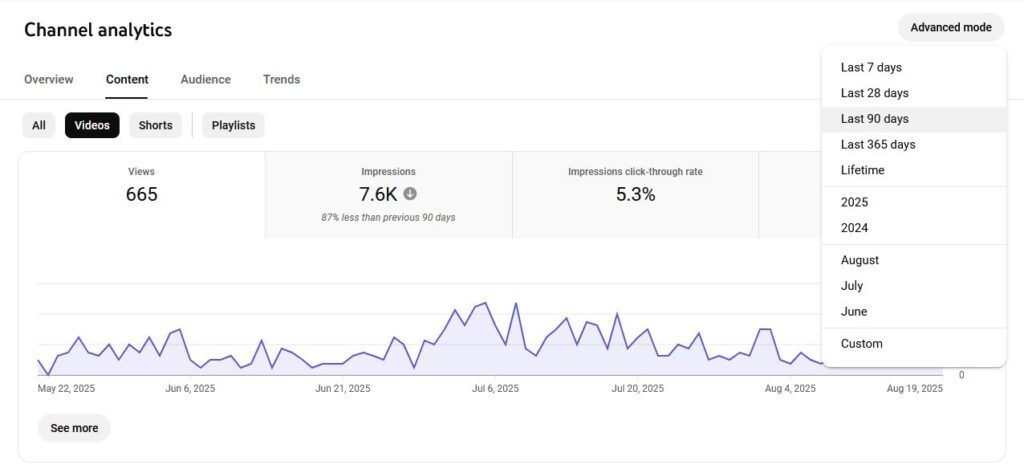
If they’re all a specific type of video or follow a key format, you might be onto something. Look for small things that might be making a big difference in viewer engagement. For instance, if you see that your tutorials consistently keep people watching longer than your vlogs, it’s a signal to lean more heavily into that format.
Find content gaps by investigating your traffic sources
Your traffic sources are a goldmine for new ideas. Go to the Reach tab and check out the YouTube search terms card. It’ll tell you the exact phrases people are typing into the search bar when they find your videos.

This information alone can be useful, but it isn’t the key part. Your goal here is to look for search terms you haven’t made a video about.
If people are mostly finding you through one type of search (like, “easy weeknight dinners” for a cooking channel) but you only have one video directly related to that search, you’ve found a content gap. Your audience is telling you what to make next.
Turning audience behavior into channel strategy
This is where you move from just making videos to building a complete strategy. We’ve looked at how your analytics data shows you what to make, now let’s see how it helps work out how and when to release it for the biggest impact.
When should you upload?
Consistency is key, but it’s also important to know when your viewers are online. Head over to the Audience tab and find the chart called When your viewers are on YouTube. This’ll show you the days and hours your audience is most active. If you publish videos an hour or two before these peak times, you’ll give your videos the best possible launchpad.
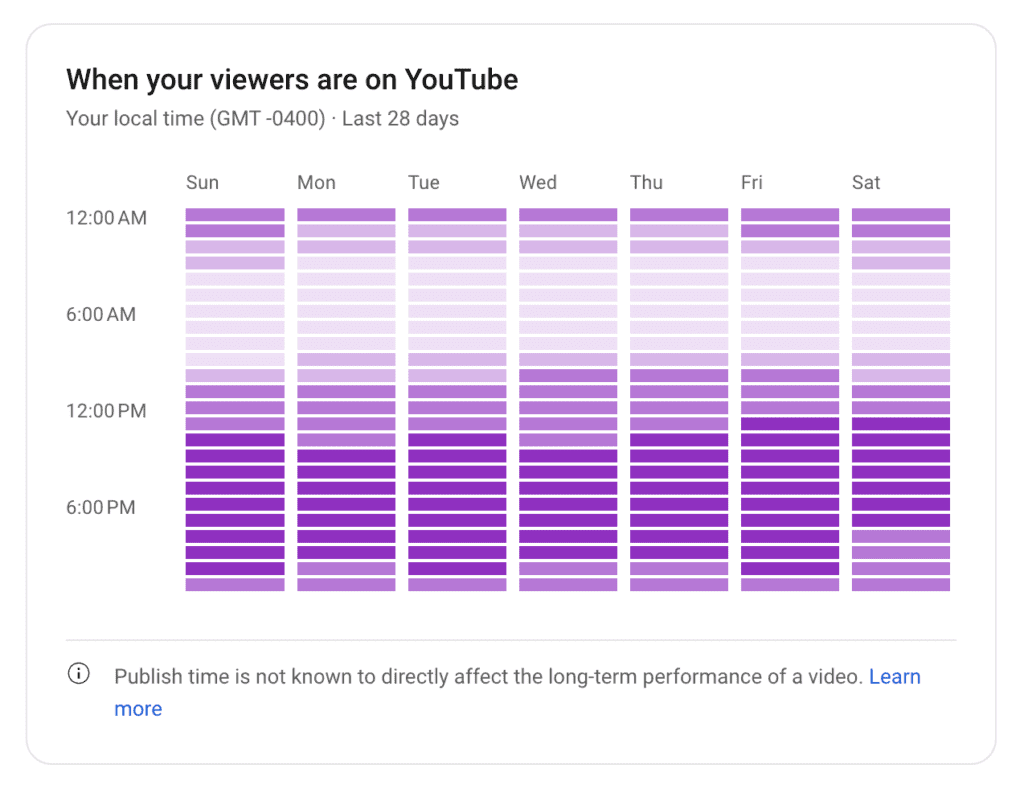
If your audience is active on weekends, upload on Friday. You’ll get more attention from a single upload at the busiest times than you will by posting multiple times a week on less active days. If you’re seeing the same pattern consistently across all of the days of the week like the above graph shows, that makes it easy to find the best time to upload.
As Jade Beason (creator and marketing consultant) puts it, “Platforms reward consistency because recent engagement affects how the algorithm pushes your content. If you’ve been consistent, the platform sees that past engagement and uses it to push your next post higher. But the advice ‘just post a lot’ misses this nuance. You need both quality improvement and algorithm awareness for consistency to work.”
How should you share your videos?
Are your posts on X actually driving views? Is your newsletter worth the effort? Your traffic sources in the YouTube video analytics will tell you which video marketing efforts are working. If you share every new video on social media but your traffic from that site is less than 1%, you’re better off spending your time elsewhere.
You can also treat your short-form content as a distribution tool. Post a Short that teases your new long-form video, then see if it leads to a bump in traffic for the main video. If it does, double down on that strategy for your next video.
How should you package your videos?
Your thumbnail and title do all the heavy lifting to get that first click, and CTR is the metric that tells you if they’re working. The only way to know what works is to experiment.
Try a month of thumbnails with your face in them, then a month without. Do the same for your titles. Try to find out whether questions (like, “Is this the best camera for beginners?”) do better than statements (like, “This is the best camera for beginners”). Let the CTR be your guide, and you’ll slowly develop a signature style that works.
Avoiding data paralysis: When to check your analytics and what to ignore
It’s easy to get addicted to hitting refresh on your analytics, but that’s a fast track to burnout and it won’t help your channel. The trick is to build a healthy routine and focus on the long-term trends.
Instead of living in YouTube Studio, try something like this:
- 24-48 hours after publishing: Take a quick peek to see the video’s initial CTR and retention to get an early idea of its performance.
- Weekly review: Spend 30 minutes every Monday looking at the past week. Find out which video was best (and try to work out why). Look into where your new viewers came from and track any changes in your average CTR and view duration compared to last week.
- Monthly deep dive: Once a month, block out an hour to look at the big picture. Dive into your demographics, traffic sources, and the videos that brought in the most subscribers. Use these insights to plan your next month of content.
For your own sanity, you’ll need to learn to ignore the noise. Don’t worry about hour-by-hour views. The algorithm has a mind of its own, and your video might simmer for days before it finds its audience. Likewise, you’ll never please everyone, so don’t worry about a few dislikes or lost subscribers. If there are tons, you might want to reassess your strategy. But don’t fret the small numbers.
And finally, try to avoid the real-time view count. Watching that number go up and down is just a form of procrastination. Close the tab and go outline your next video!
How analytics can help you grow off-platform
You can use the insights you get from YouTube to build your brand and business everywhere else. Here’s what you can do:
- Create better pitches for sponsorships: When you pitch a brand, they want proof. With YouTube’s analytics, you can show that your audience demographics match their target customers. You can also show that your high average view duration is evidence that your viewers are engaged and will actually see the sponsorship message.
- Inform social media cross-promotion: Audience retention is a cheat sheet for your social content. Find the peaks where people are most engaged, then clip them out. These moments are perfect for Instagram Reels or TikToks because you already have data proving how compelling they are.
- Find good candidates for repurposing content: Evergreen videos are ones that get steady views from search traffic every month. These topics are powerful, and you should use them everywhere. For instance, you could turn them into detailed blog posts or weekly tip series for your newsletter. You’ll get more mileage from your best ideas and introduce your work to new audiences at the same time.
Final tips and mistakes to avoid
As you get more comfortable using analytics, keep these tips in the back of your mind:
- Don’t overreact to one data point. A single bad video doesn’t mean the idea is a bust. Look for patterns across multiple videos or weeks before you decide to change course.
- Don’t chase trends that don’t fit your audience. Jumping on a viral meme can get you a quick burst of views, but it can alienate your core community if it feels random and off-brand. If you can’t find a way to make it fit with your niche organically, it’s safer to avoid it.
- Every “failure” is just a test. Sometimes a great idea is hidden behind a bad thumbnail. If a video you liked didn’t perform well, don’t just scrap the idea. Try it again in a few months with a new approach, different title, and a fresh thumbnail.
Start creating better YouTube videos
Once you learn to focus on the numbers that matter, you can trade guesswork for strategy. Use your data as a compass. It’ll point you toward content that resonates with your audience, grows your channel, and helps you build something you’re proud of.
Of course, great data isn’t everything. To keep your audience engaged, you need high-quality video assets. With a Storyblocks subscription, you get unlimited access to royalty-free stock video, audio, and easy-to-use templates that will make your content shine.